|
I'm always on the hunt for new activities and resources. Today, after deciding I would try out one new activity with my classes each week, I've been having a play around with Powtoon, a site which allows you to create your own animated presentations. It's a jazzier and more exciting alternative to PowerPoint. It's free, easy to use and you can even embed the videos onto your blog. Here's one I made today for my Year 8s. I may even use it for Flipped Learning as I haven't tried that yet either.
0 Comments
I've started preparing these help sheets for my KS4 classes for when they're writing their controlled assessment paragraphs. As my classes are so mixed I wanted to make sure my lower ability students had plenty of support and that the higher ability students were being challenged enough. I told the lower ones to use the example on the sheet as a guide for their own but that the A/A* students could pretty much do their own thing as long as it was all relevant. These students are now at the stage where they know what to include to achieve an A/A* and don't need much input from me anyway. On each sheet I've included an example paragraph plus the English translation, ideas on what they could include and what they need to do to reach their target grade. Feel free to use these with your own classes or you could just use the template and change it so that it's relevant for your students. I also encourage mine to use my Independent Learning Folders which are really helpful. Read more about them here. Can you think of any ways I could improve these sheets and is there anything you do similar with your own classes? 
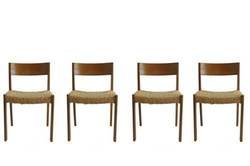 Bring 4 students to sit on chairs at the front of the class. The rest of the class must ask each in turn a question. If they answer correctly the person stays on the chair. If not the questioner takes their place. The 4 who are still on the chairs at the exact moment the bell rings win house points/sweets.
Each student has a piece of paper with a sentence in the TL and the translation underneath. The students walk around the room reading their sentences to each other. The other person translates and then does the same with their card. If both people translate each others’ cards correctly they can swap. The more swaps the better.
Does anyone know I can't remember where I got this idea from and have no idea why it's called Rhubarb but my students go crazy for this one. In groups everyone has a copy of the text to read along. One person starts reading it and if they make a mistake, or someone thinks they do, they shout "Rhubarb" and tell you what they think went wrong. If they are correct the student who shouted out ‘Rhubarb’ takes over reading and wins a point for their team. If they hadn’t actually made a mistake, the student who was originally reading gets a point for their team and carries on reading. 
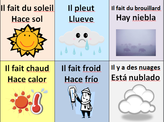 I have this up on the wall in my classroom but don't use it as much as I'd like to. Print out, laminate and cut out the cards then add velcro to the back of them. You could choose a different student to change this each day. 
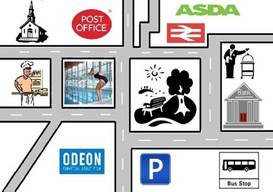
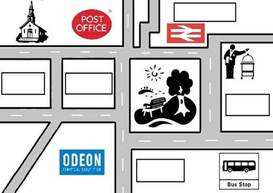
Each student has a sheet with two maps, their own and their partner's map with places missing. They have to ask their partners where the places are and then fill in their own map. There is a support sheet to help them with this. There is also a slide on the PowerPoint which has the words which are missing from each map. These maps were made by my partner so thank you to him, although he is a town planner so I think he enjoyed it!
This morning I tweeted asking for ways to use QR codes in teaching and I've had so many brilliant responses which I can't wait to use myself...
@CheckettsSarah 'Links to stretch & challenge activities & tasks. Also, for sharing great work with parents on email home or at open eve.' @iGael1 'Link to Dept Google Files such as past papers and audio files!' @bumsonseats 'Treasure hunts' @joedale 'For videos, I would upload to Google Drive & make the file available to anyone within the link. Easy to now do with app' 'For audio, I would use iPadio link ending in .mp3 or add .mp3 to Audioboo link so they play automatically in browser''Sharing screencasts via Screenchomp :-)' 'Have text QR code displayed as students come in to class. They scan it and it gives instructions for starter activity' @_Hannah_Edwards 'Feedback-common mistakes and students self assess which mistakes are in their work and reflect on learning making corrections.' 'Additional vocabulary to stretch more able and self assessment for writing.' @dawson_serena 'I have used to link to student speaking and then stuck into books (providing evidence of speaking). Added to display posters too.' @reebekwylie 'I am in the process of making QR code labels to stick in books after marking to link to a sheet/vid about where they went wrong explaining common mistakes such as word order, verb endings etc' @PerthHighMFL 'Make displays interactive. For example on our "Why learn languages?" We have qr codes with links to celebs speaking languages!' @bpardoel 'Training listening skills: QR Codes lead to YouTube/audiofiles. Students can re-listen & work in their own pace.' @MrGWallCymraeg'Links to Aurasma channel, to on-line dictionaries, to Quizlets :)' Also see @missmclachlan's blogpost about Vocaroo Thank you to everyone here who has shared their ideas! Check out my previous blog post about QR Codes for more information. 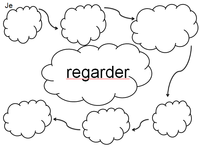 This activity is a good one to use when checking whether they've understood how to form a new tense.
Students can work in pairs and each are given a sheet which looks like this: Every sheet will have a different infinitive in the middle. You may want to use verbs with the same endings/regular verbs if the class are low ability. They have to agree on what to write for the first person singular of their infinitive and add this to the top left cloud. Then they pass their sheet on to the next group so that they have a different verb. Now they will do the same for the second person singular in the next cloud and so on. This helps them understand that the rules will be the same for different verbs. Make sure they know who to pass their sheet to and tell them not to pass their sheet on until you say so (maybe you could use a timer) otherwise it will be mayhem. You also need to make it clear that they only fill in one cloud on each sheet because they can get a bit keen and will try and do all the clouds at once. The last group should check the answers are correct.  I learnt this one during my second placement of my PGCE up North and it's a nice thing to do at the end of the lesson to see how much they've learnt. All you need is a ball of string.
Students each think of a sentence or more using the vocabulary they have learnt during that lesson. They stand around in a circle and one person is chosen to say their sentence out loud, then hold the end of the string while they throw/pass the ball to another student, who will also hold part of the string. The ball of string should unravel each time and in the end you'll be left with a giant spider web. This helps you see who has spoken and who hasn't. Students love this, especially when you get caught in the middle of the web! This activity works well with smaller classes and is probably better to use with KS3 or below. You could also get them to answer questions on the current topic or what they have learnt that day or get them to say words or phrases instead of sentences. I think this would work well in other subjects too. Have you used anything similar to this? Can you think of any other ways you could use this activity? 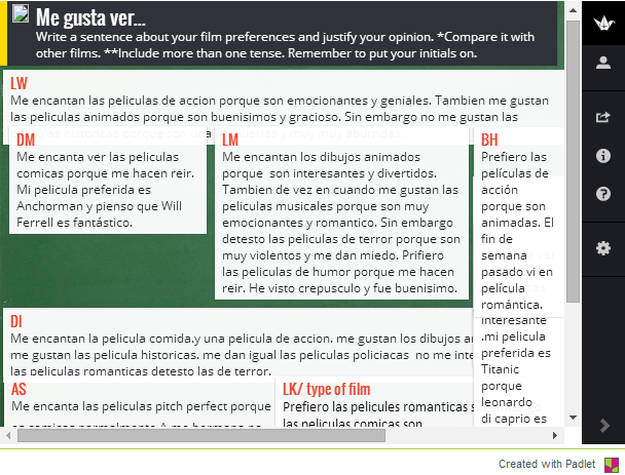 Padlet is a website which allows you to create your own wall where people can add comments. I've used this in the past for lessons in the computer room. I created my board then embedded it onto my student blog. It can be quite difficult to keep a track of student progress when they're on the computers but this worked quite well. I asked students to write a few sentences on the board about the topic we had been covering using the vocabulary they had learnt that lesson and this was the outcome.
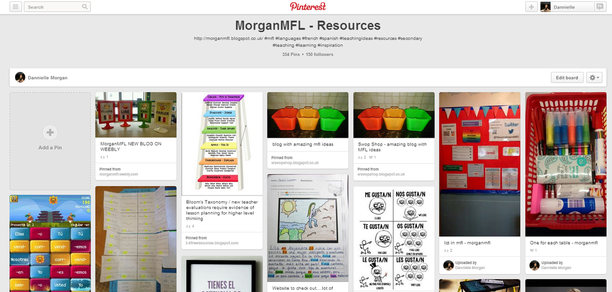 I must admit I’m a teeny bit obsessed with Pinterest. For anyone who doesn’t know already, Pinterest is a website which allows people to upload images or add them from another website. You can create different boards and either add your own images (pins) to them or re-pin other people’s pins. These can be public or private and you can even invite other people to pin things to your board. I’ve used it for a range of things from finding inspiration for my wedding to looking up tasty recipes. So how does this relate to teaching? You could make a board of teaching ideas. I’ve found so many brilliant ideas on Pinterest and love how easy they are to find too. There’s even an Education section or you could just type whatever you’re looking for in the search box. Here’s my Teaching Resources board – some are my own ideas but a lot of them are re-pins from other lovely teachers. You could also make a board for your students. I made a couple for our department (one for French and one for Spanish) where I’ve pinned videos, websites, quotes and cartoons. I’m hoping to use these with my students for homework tasks this year. Maybe they could choose a quote/cartoon and translate it into English. You could even use them as a nice way to introduce a new topic. There are lots of Spanish ones for Technology in particular. Here are some examples of what you can find on there... What do you use Pinterest for? Do you have any boards you’d be willing to share? Or any ideas on how students could use it? Feel free to leave a comment below.
|
|||||||||||||||||||||||||||||||